This article was written with AI assistance and reviewed for accuracy where possible; details about unreleased or rumored products may change.
We live in an era of connectivity. Between our smartphones, tablets, smartwatches, and laptops, our homes have become hubs of constant energy consumption. While the technology itself is sleek and often minimalist, the accessories that keep our devices running—the dreaded charging cables—are anything but. They snake across our floors, tangle in our drawers, and create a visual noise that can make even the most organized space feel chaotic.
If you find yourself digging through a ‘junk drawer’ of knotted white wires every time your phone hits ten percent battery, you aren’t alone. Cable management is the unsung hero of home organization. By taking a few hours to curate your charging station and implement a system for your wires, you can reclaim your desk, your nightstand, and your peace of mind. Let’s dive into how you can turn your cable catastrophe into a streamlined setup.
The First Step: The Great Purge
Before you buy any organizers, the most important step is to audit your inventory. We all have that one bag or box filled with cables from devices we no longer own. You know the ones: proprietary chargers for flip phones from 2008, three-foot USB-A to Micro-USB cables that have seen better days, and frayed wires that are a genuine safety hazard. If a cable is frayed or the insulation is peeling, it belongs in the recycling bin, not in your organized system.
Group your cables by type: Lightning, USB-C, Micro-USB, and dedicated proprietary chargers. If you have five cables for a device you don’t even use anymore, donate or recycle them. The goal is to keep only what you use daily, plus one spare of each type kept in a dedicated ’emergency’ storage bin. Once you have thinned the herd, you will be surprised at how much smaller your collection actually is.
Creating a Dedicated Charging Station
Instead of having cables scattered across every room, try to centralize your charging needs. A dedicated charging station is the gold standard for home organization. This can be as simple as a decorative tray on your entryway table or as sophisticated as a hidden charging dock built into a drawer.
If you are setting up a workspace, consider a desk organizer that features built-in cable management. Look for items that allow you to route cables through the back of the desk or through clips attached to the underside. This keeps the surface clean for your essentials—perhaps a stylish notebook, a fresh T-shirt or hoodie for your work-from-home days, or your favorite watch—without the distraction of tangling wires. By designating a specific spot for your devices to ‘sleep’ at night, you stop the ‘where is my charger?’ panic before it starts.
The Magic of Cable Clips and Management Sleeves
If you prefer to keep your chargers where you use them, you need to manage the wire sprawl. Cable clips are inexpensive, adhesive-backed tools that stick to the edge of your desk or nightstand. They hold the head of the cable in place so that when you unplug your phone, the cord doesn’t slide off the table and fall into the abyss behind your furniture.
For cables that run along the floor or down the back of a desk, cable sleeves or management boxes are game-changers. Sleeves bundle multiple cables together into a single, neat tube, which is perfect for setups involving monitors and lamps. If you have a power strip that is constantly covered in plugs, a cable management box is your best friend. These boxes hide the entire power strip and the mess of plugs inside a sleek, enclosed container, leaving only the necessary length of cable exposed.
Color Coding and Labeling for Efficiency
If you live in a multi-person household, you have likely dealt with the ‘who stole my charger?’ dilemma. The solution is simple: labeling. Use small adhesive labels or colored heat-shrink tubing to mark your cables. This is especially helpful if you and your family members use the same types of devices but want to keep your personal chargers separate.
Alternatively, you can use color-coded cable ties. Velcro ties are generally superior to plastic zip ties because they are reusable and don’t damage the cable casing. By assigning a specific color of Velcro to each family member—or to each device type—you can visually identify which cable belongs where at a glance. It’s a small, proactive habit that pays dividends in daily convenience.
Travel Organization: Cables on the Go
We often neglect our travel gear until we are at the airport, desperately trying to untangle a mess of wires from our carry-on bag. A dedicated tech pouch is a travel essential. Look for a pouch with elastic loops and mesh pockets specifically designed to hold cables, power banks, and adapters.
When packing cables for a trip, use the ‘over-under’ coil method to avoid creating twists in the wire. Secure the coil with a Velcro wrap. If you have a long cable, don’t just shove it into your bag; coil it neatly and secure it. When you arrive at your destination, you will be able to set up your tech in seconds, leaving more time to enjoy your vacation or focus on your business trip. Keep your travel tech bag stocked with a ‘go-kit’ so you never have to scramble before heading out the door.
Hidden Tech: Integrating Storage Into Your Home Decor
Cable management doesn’t have to look industrial. There are many ways to hide your tech in plain sight. If you are shopping for home goods, look for furniture that integrates smart storage. Some modern nightstands come with pre-drilled holes in the back for cable routing, and some side tables have hidden compartments for power strips.
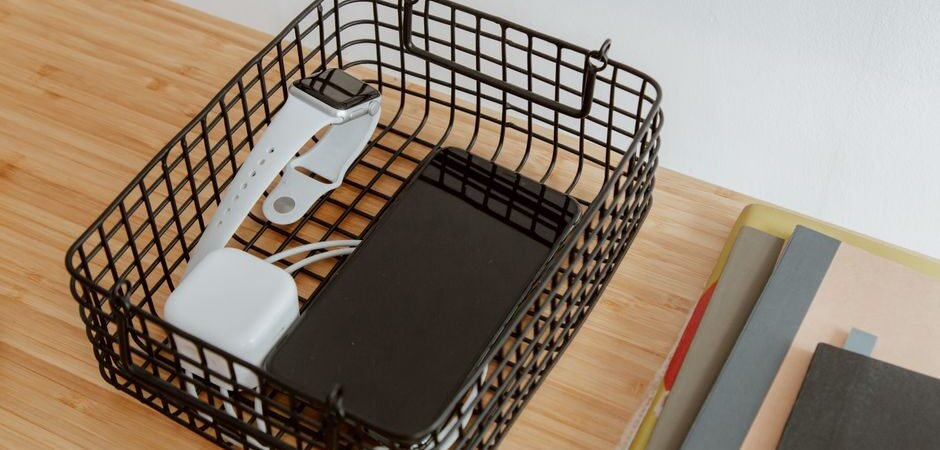
If you aren’t ready to replace your furniture, look for decorative baskets or boxes that can house your charging hub. Placing a decorative box on your kitchen counter or entryway console can turn a charging mess into a clean, curated display. You can even use decorative trays to keep things tidy; by simply grouping your chargers on a tray rather than letting them sprawl across a surface, you create a sense of order that makes the room feel instantly more intentional.
The Long-Term Maintenance Mindset
Once you have implemented these systems, the challenge becomes maintenance. Cable organization is not a ‘one and done’ task. It requires a mindset shift. Every time you finish using a cable, take the three extra seconds to coil it properly and place it back in its designated spot or clip it to the edge of the desk.
Every few months, perform a quick check of your cables. Are they starting to fray? Is the connector loose? If so, replace them before they fail. By treating your charging cables as a permanent part of your home infrastructure rather than disposable accessories, you extend their lifespan and keep your home looking sharp. Remember, an organized space is an organized mind. When you remove the visual clutter of tangled wires, you create more room for the things that truly matter—whether that’s focusing on a project, spending time with family, or simply enjoying a clean and beautiful home environment.
As you continue to refine your living space, think of cable management as part of your overall design aesthetic. Just as you carefully choose your wardrobe—selecting the right shirts, hoodies, and accessories to express your style—your home’s tech should reflect your commitment to quality and organization. Whether you are looking for new desk accessories, organizers, or even the latest in home tech, keeping your cables under control is the foundation upon which all other organization is built. Start small, pick one area of the house to conquer today, and enjoy the satisfaction of a truly tangle-free life.
The Role of Cable Length and Power Delivery
Beyond just managing where your cables go, it is worth considering the length of the cables you actually use daily. Many of us default to the six-foot cables that come in the box, but these are often overkill for a desktop setup, leading to excess slack that inevitably tangles. Swapping out standard cords for shorter, custom-length cables—such as six-inch or one-foot versions—can eliminate the need for complex management tools entirely. When a cable is the exact length required to reach from your power source to your device, the visual clutter disappears, and the physical stress on the cable’s connection points is significantly reduced.
Investing in Future-Proof Charging Hardware
Another frequently overlooked aspect of cable management is the power source itself. If you find yourself needing to plug in three or four different wall adapters, you are creating a recipe for a crowded and inefficient power strip. Transitioning to a high-wattage GaN (Gallium Nitride) multi-port charger can consolidate your power needs into a single, compact unit. These chargers allow you to power a laptop, a tablet, and a smartphone simultaneously from one outlet using high-quality USB-C cables. By reducing the number of bulky adapters plugged into your wall or power strip, you minimize the physical footprint of your charging station, making it easier to hide behind furniture or tuck into a dedicated organizer box.
The Ergonomics of Cable Routing
While the visual impact of cable management is undeniable, there is a functional benefit to how you route your cords that often goes ignored: the strain on your devices. When cables are pulled tight or forced into sharp bends to reach a port, the internal wiring can degrade over time, leading to slow charging speeds or intermittent connections. To protect your hardware, ensure your routing path allows for a gentle curve rather than a rigid angle. Using rotating cable clips or flexible cable ties can help guide the wire in a natural arc, which preserves the longevity of the connector and the internal copper strands. If you find your cables are constantly under tension, it is a clear indicator that your power source is too far from your workspace; moving your power brick or hub closer to your device will reduce this mechanical stress and help your cables last significantly longer.
Managing Wireless Charging Integration
As more devices transition to wireless charging, the way we think about cable management needs to evolve. Wireless charging pads are excellent for reducing the “plug-in” clutter, but they still require a primary cable to connect the pad to your wall outlet. To keep these setups looking clean, consider using adhesive cable tracks that run along the leg of a table or the back of a nightstand. This hides the single power cord that feeds your wireless station, effectively making it appear as if the device is powered by magic. Furthermore, be mindful of the surface you place your wireless charger on; using a non-slip pad or a small, dedicated mat can prevent the charger from sliding around, ensuring that your device stays properly aligned and charging efficiently without the need for constant adjustment.
Optimizing for Cable Modularity
As you refine your setup, consider the benefits of a modular cable system. Rather than relying on fixed-length cables that serve only one purpose, you might invest in magnetic cable management systems. These kits typically include a small magnetic base that stays anchored to your desk and magnetic cable ends that snap into place when not in use. This approach eliminates the “searching for the connector” frustration because the cable end stays exactly where you left it, neatly hovered at the edge of your workstation rather than slipping behind your desk or getting tangled in your keyboard tray.
Addressing the “Under-Desk” Ecosystem
The space beneath your desk is often the final frontier of cable management. If you have a permanent home office, investing in an under-desk cable tray is significantly more effective than relying on simple adhesive clips. These metal or plastic channels attach to the underside of your desk and provide a shelf for power strips and excess cable slack. By lifting the weight of your power bricks off the floor, you not only improve the aesthetics of your workspace but also make vacuuming and floor maintenance much easier. When routing cables from this tray to your devices, try to use “cable spines” or flexible umbilical tubes; these keep bundles of cords together as they travel from the desk surface to the floor, transforming a chaotic web of wires into a single, clean column that integrates seamlessly with your furniture.